# Brain Stem segmentation/visualization for nuclei and tracts
**URL:** https://community.mrtrix.org/t/brain-stem-segmentation-visualization-for-nuclei-and-tracts/7496
**Category:** Uncategorized
**Created:** [April 4, 2024, 11:19am UTC](https://community.mrtrix.org/t/brain-stem-segmentation-visualization-for-nuclei-and-tracts/7496 "2024-04-04T11:19:28Z")
**Posts on this page:** 11
**Page:** 1
### Author:  [@Emre](https://community.mrtrix.org/u/Emre)
#### Post date: [April 4, 2024, 11:19am UTC](https://community.mrtrix.org/t/brain-stem-segmentation-visualization-for-nuclei-and-tracts/7496/1 "2024-04-04T11:19:28Z")
I want to visualize/segment the nuclei and tracts in the brainstem using images such as DWI and MRI. I read about this being done with MRtrix in a previous study, but unfortunately, I couldn’t find the study now.
Does anyone have information on this? My goal is to visualize/segment the nuclei and tracts (the important structures) in the brainstem. If it can be done with any other program, that would also work.
Kind Regards
Emre
---
### Author:  [@Emre](https://community.mrtrix.org/u/Emre)
#### Post date: [April 4, 2024, 12:01pm UTC](https://community.mrtrix.org/t/brain-stem-segmentation-visualization-for-nuclei-and-tracts/7496/2 "2024-04-04T12:01:48Z")
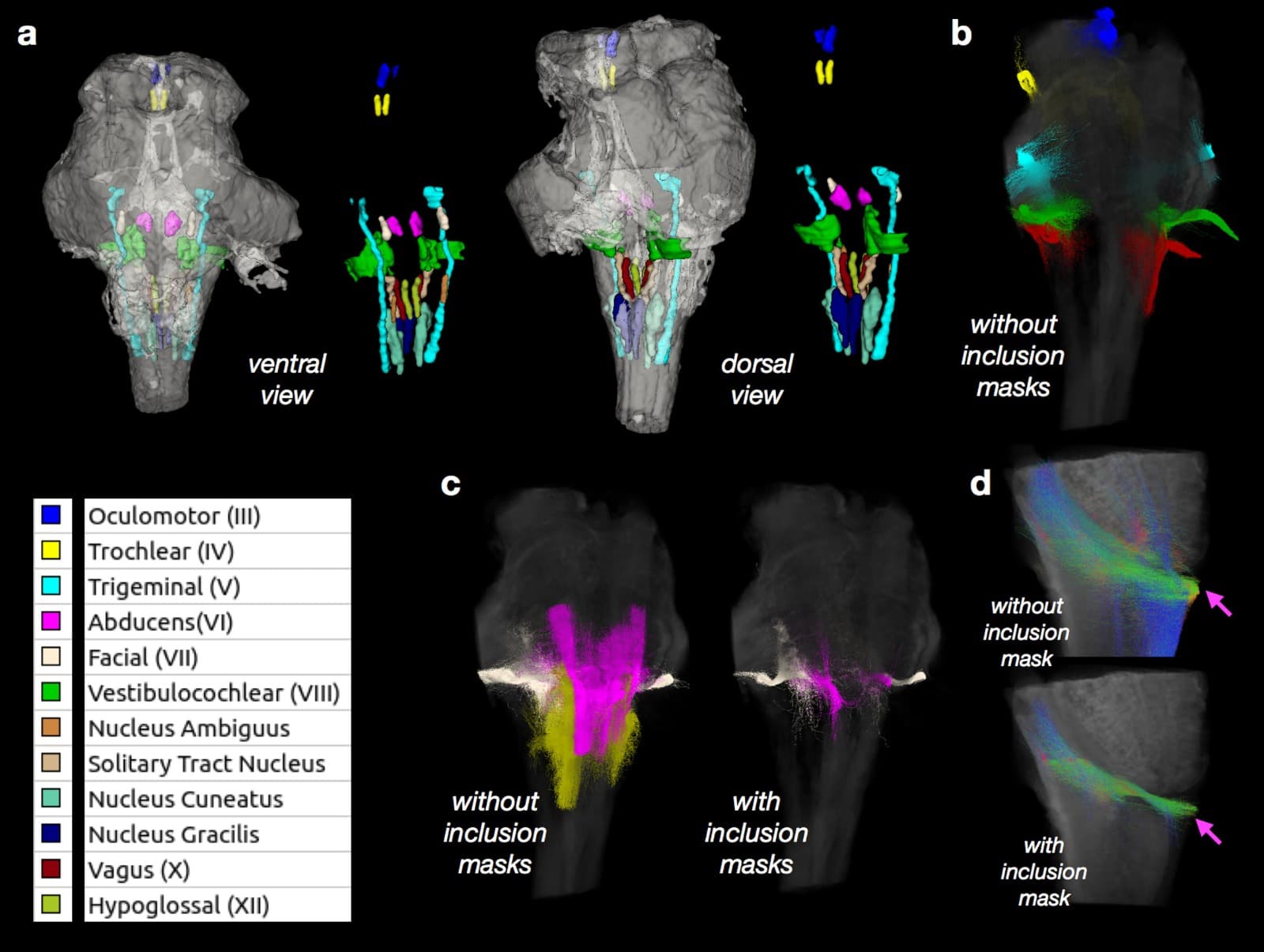
I found the study I mentioned. It mentions the use of MRtrix, TORTOISE3, and ITKsnap, but it doesn’t explain how they were implemented.
Is there a specific article or code example regarding the implementation of this task?
[https://cds.ismrm.org/protected/18MProceedings/PDFfiles/2061.html](https://cds.ismrm.org/protected/18MProceedings/PDFfiles/2061.html)
---
### Author:  [@adsouza](https://community.mrtrix.org/u/adsouza)
#### Post date: [April 4, 2024, 11:18pm UTC](https://community.mrtrix.org/t/brain-stem-segmentation-visualization-for-nuclei-and-tracts/7496/3 "2024-04-04T23:18:39Z")
Hi Emre,
This can probably be done in mrview using a combination of the volume render and tractography visualisation toolbars.
Also, check out the function [mask2glass](https://mrtrix.readthedocs.io/en/dev/reference/commands/mask2glass.html). `mask2glass` can be used for the whole-brain mask as well as sub-structures.
Streamlines can be viewed either by using the tractography visualisation toolbar, or, consider using `tckmap` to convert the .tck file to a .mif file, which can subsequently be used as a main image (or image overlay).
Hope this helps!
Cheers,
Arkiev
---
### Author:  [@erikanyc](https://community.mrtrix.org/u/erikanyc)
#### Post date: [April 5, 2024, 1:23pm UTC](https://community.mrtrix.org/t/brain-stem-segmentation-visualization-for-nuclei-and-tracts/7496/4 "2024-04-05T13:23:39Z")
Hi Arkiev,
The mask2glass function looks fun to try, but I do not see it in the most recent release. Do you know what version this is from?
Thanks!
---
### Author:  [@adsouza](https://community.mrtrix.org/u/adsouza)
#### Post date: [April 7, 2024, 11:52pm UTC](https://community.mrtrix.org/t/brain-stem-segmentation-visualization-for-nuclei-and-tracts/7496/5 "2024-04-07T23:52:45Z")
Hi Erika,
I’m using version mrtrix3 version 3.0.4 (and `mask2glass` works) 🙂
Cheers,
Arkiev
---
### Author:  [@adsouza](https://community.mrtrix.org/u/adsouza)
#### Post date: [April 8, 2024, 12:04am UTC](https://community.mrtrix.org/t/brain-stem-segmentation-visualization-for-nuclei-and-tracts/7496/6 "2024-04-08T00:04:09Z")
Hi again,
After reading this [New command "mask2glass" by remikamito · Pull Request #2359 · MRtrix3/mrtrix3 · GitHub](https://github.com/MRtrix3/mrtrix3/pull/2359) it might be worth giving the dev branch a go…
Cheers,
Arkiev
---
### Author:  [@erikanyc](https://community.mrtrix.org/u/erikanyc)
#### Post date: [April 8, 2024, 1:30pm UTC](https://community.mrtrix.org/t/brain-stem-segmentation-visualization-for-nuclei-and-tracts/7496/7 "2024-04-08T13:30:35Z")
oh great, thanks for finding that in the dev branch, I didn’t see it at first pass. I am also on 3.0.4 but with the precompiled version.
I also found this from the archives if helpful to original post.
> [@Fiber tract visualised on a glass brain](https://community.mrtrix.org/t/fiber-tract-visualised-on-a-glass-brain/4932):
>
> Hi everyone, I’m trying to represent a fiber tract on a glass brain. I tried several ways but all failed. My fiber tracts are in .tck format. Anyone knows how to generate a figure like the one below? Thanks a lot! Best, Chunxiang
-e
---
### Author:  [@Emre](https://community.mrtrix.org/u/Emre)
#### Post date: [April 8, 2024, 2:11pm UTC](https://community.mrtrix.org/t/brain-stem-segmentation-visualization-for-nuclei-and-tracts/7496/8 "2024-04-08T14:11:55Z")
The problem is,
I dont understand how can I build the proper .tck file or .mif file which has nucleus and tracts in it (which are specific to brain stem such as DCML, Superior colliculus…).
I mean building a glass brain and putting the segmentation in it seems cool but as I said I could not understand the part which is creating those segmentations.
And also I am looking for a semi-automatic way to do it. If there is no other choice then manual way is an option.
Emre
---
### Author:  [@adsouza](https://community.mrtrix.org/u/adsouza)
#### Post date: [April 9, 2024, 4:15am UTC](https://community.mrtrix.org/t/brain-stem-segmentation-visualization-for-nuclei-and-tracts/7496/9 "2024-04-09T04:15:31Z")
Hi Emre,
There are a few options… [TractSeg](https://github.com/MIC-DKFZ/TractSeg) might be able to segment the pathways of interest.
Alternatively, the commands `tckgen` and `tckedit` might be worth exploring, along with options such as `-include`, `-exclude` and `-seed_image`. The `ends_only` in `tck_edit` might also be useful here. This will involve conducting manual segmentations to identify regions of interest that the streamlines must traverse or avoid 🙂
Hope this helps!
Cheers,
Arkiev
---
### Author:  [@egemen4552](https://community.mrtrix.org/u/egemen4552)
#### Post date: [April 23, 2024, 9:25pm UTC](https://community.mrtrix.org/t/brain-stem-segmentation-visualization-for-nuclei-and-tracts/7496/10 "2024-04-23T21:25:34Z")
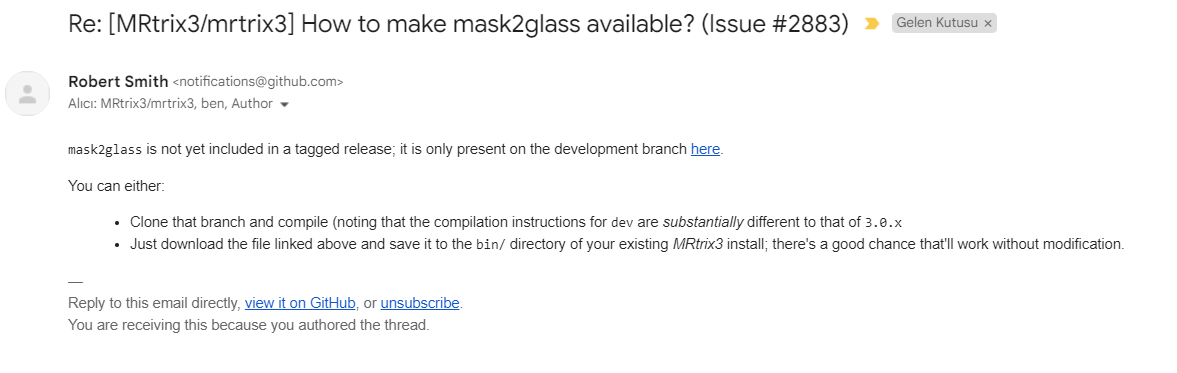
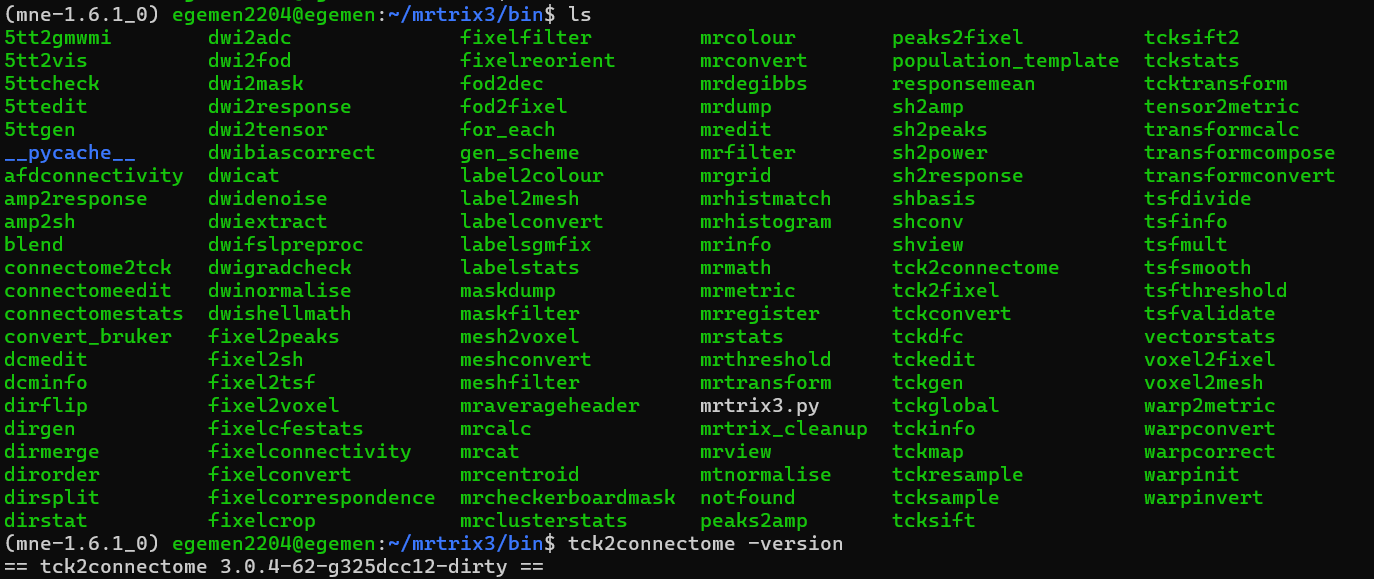
I have trouble with mask2glass,
How did you make it available for your system? I am also on 3.0.4 but I dont know how to make it available
---
### Author:  [@egemen4552](https://community.mrtrix.org/u/egemen4552)
#### Post date: [April 24, 2024, 3:30am UTC](https://community.mrtrix.org/t/brain-stem-segmentation-visualization-for-nuclei-and-tracts/7496/11 "2024-04-24T03:30:22Z")
okay, this works