# Error 195
**URL:** https://community.mrtrix.org/t/error-195/5908
**Category:** Uncategorized
**Created:** [August 2, 2022, 1:01pm UTC](https://community.mrtrix.org/t/error-195/5908 "2022-08-02T13:01:21Z")
**Posts on this page:** 4
**Page:** 1
### Author:  [@SAA](https://community.mrtrix.org/u/SAA)
#### Post date: [August 2, 2022, 1:01pm UTC](https://community.mrtrix.org/t/error-195/5908/1 "2022-08-02T13:01:21Z")
I wonder what is the problem when I install MRtrix follow the insturction on my Vmware(Ubuntu20) with this error 195/564 ?
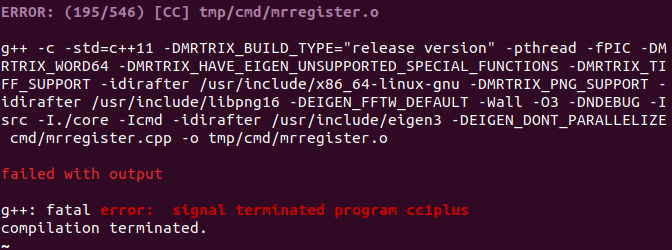
Reference to this insturction, is it due to some missing dependencies? If so, how can I find them?(where is the package database?)

---
### Author:  [@jdtournier](https://community.mrtrix.org/u/jdtournier)
#### Post date: [August 2, 2022, 1:08pm UTC](https://community.mrtrix.org/t/error-195/5908/2 "2022-08-02T13:08:45Z")
My guess if your system is running out of memory… This can happen particularly if you have a system with a lot of CPU cores, and don’t allocate at least 1GB RAM per core.
Assuming you’re running some recent variant of Linux in your VM, to see how much ram is available in your VM:
```auto
free -h
```
To see how many cores are available in your VM:
```auto
lscpu | grep 'CPU(s):'
```
* * *
If there is just about enough RAM, you can typically just re-run the `./build` command until it completes. It may fail a few more times, but at some point it’ll probably get over the tricky part where a few very memory-hungry compile jobs are competing for the available RAM, and finish the job.
Otherwise, you can prevent the build from using too many CPU cores, use the `NUMBER_OF_PROCESSORS` environment variable, like this:
```auto
NUMBER_OF_PROCESSORS=2 ./build
```
It’ll take longer, but it may at least avoid out of memory errors…
---
### Author:  [@SAA](https://community.mrtrix.org/u/SAA)
#### Post date: [August 4, 2022, 10:32am UTC](https://community.mrtrix.org/t/error-195/5908/3 "2022-08-04T10:32:33Z")
Thank you very much! It seems that I allocate more RAM to cores can solve this problem.
However there are some other problems in this build step. Therefore I change to install with Anaconda successfully.
But in this way, I cannot find where did it install. If there is any method to check the position where it install or how can I uninstall if I want to reinstall in the future. I didn’t find the related instruction on the mrtrix website.
---
### Author:  [@jdtournier](https://community.mrtrix.org/u/jdtournier)
#### Post date: [August 4, 2022, 10:39am UTC](https://community.mrtrix.org/t/error-195/5908/4 "2022-08-04T10:39:58Z")
No problem. When you say you installed with anaconda, do you mean you installed the precompiled package that we provide using the `conda install` command? If so, it’ll install wherever the default location is for anaconda. I was hoping to find the relevant info on the [anaconda documentation](https://docs.conda.io/projects/conda/en/latest/user-guide/tasks/manage-pkgs.html), but it doesn’t seem to make it easy to query the exact list of installed files… You can always type:
```auto
which mrconvert
```
to figure out where it is – but that assumes it’s already in your PATH and available at the command-line…