# The MRtrix3 Python script library
**URL:** https://community.mrtrix.org/t/the-mrtrix3-python-script-library/2243
**Category:** Wiki
**Created:** [February 8, 2019, 3:51am UTC](https://community.mrtrix.org/t/the-mrtrix3-python-script-library/2243 "2019-02-08T03:51:04Z")
**Posts on this page:** 7
**Page:** 1
### Author:  [@rsmith](https://community.mrtrix.org/u/rsmith)
#### Post date: [February 8, 2019, 3:51am UTC](https://community.mrtrix.org/t/the-mrtrix3-python-script-library/2243/1 "2019-02-08T03:51:04Z")
In addition to the principal binary commands in _MRtrix3_, which are written in the C++ language, _MRtrix3_ also now includes a number of Python scripts for performing common image processing tasks that can be achieved through a combination of existing commands. These make use of a relatively simple Python module library, which provide a certain level of convenience and consistency for building such scripts (e.g. help pages formatted identically to the _MRtrix3_ binary commands; command-line parsing; creation, use and deletion of temporary scratch directory; control over command-line verbosity; various convenience functions).
It is hoped that in addition to growing in complexity and capability over time, this library may also be of assistance to users when building their own processing scripts, rather than the use of e.g. Bash. It is typically easiest to commence construction of such a script by making a copy of an existing functional script from the _MRtrix3_ `bin/` directory, and then editing the contents to suit your needs.
### Executing a script that uses the _MRtrix3_ libraries
If you wish to be able to use such a script (either written by yourself, or perhaps provided to you externally from the main _MRtrix3_ package), there are two options that you must choose from in order for execution of that script to be possible:
1. Place the script file within the `bin/` directory of your _MRtrix3_ installation. The same mechanism that is used within those Python scripts provided with _MRtrix3_ for locating and loading the _MRtrix3_ Python libraries will be invoked for this script also, as long as the relevant code is present (see point 2.1 below).
2. If you wish to be able to place the executable Python script anywhere on your file system, there are two additional steps required:
### Writing a script using the _MRtrix3_ libraries
For a small example script please see the demo presented at ISMRM 2020 of the “C++ / Python API & module system”: [OSF](https://osf.io/z93eu/). Please also see the documentation [External modules — MRtrix3 3.0 documentation](https://mrtrix.readthedocs.io/en/latest/tips_and_tricks/external_modules.html) and corresponding publication [https://DOI:10.1016/j.neuroimage.2019.116137](https://doi.org/10.1016/j.neuroimage.2019.116137).
More details to come if there is sufficient demand for it…
---
### Author:  [@Hilikus](https://community.mrtrix.org/u/Hilikus)
#### Post date: [October 26, 2021, 12:23am UTC](https://community.mrtrix.org/t/the-mrtrix3-python-script-library/2243/2 "2021-10-26T00:23:26Z")
What does this python library provide exactly?
I’m trying to write a python script as part of a processing pipeline and this script needs to invoke some mrtrix actions. Is there a python API to invoke any action that mrtrix CLI can do? i’m trying to avoid having to spawn a new process with each mrtrix command and having to parse its human-readable stdout output. Is this what the python library is supposed to do? can i access _all_ of mrtrix functionality with it? part of it?
thank you
---
### Author:  [@rsmith](https://community.mrtrix.org/u/rsmith)
#### Post date: [October 27, 2021, 1:29am UTC](https://community.mrtrix.org/t/the-mrtrix3-python-script-library/2243/3 "2021-10-27T01:29:22Z")
Hi @Hilikus,
The _MRtrix3_ Python API is a fairly lightweight wrapper for automating image processing operations that can be done using a combination of existing commands. I think it’s best thought of as a better alternative to concatenating a set of commands in a Bash script. It’s about daisy-chaining commands to serve some higher-order purpose, but within a framework that intrinsically provides some useful benefits (e.g. standardised interface, command-line parsing, library functions that have proven useful to me over the years) for minimal additional development investment. But it’s explicitly not designed around direct manipulation of raw image data within Python, and it doesn’t have the internal complexity of pipeline construction of something like nipype.
Given that the majority of _MRtrix3_ commands are C++ compiled binaries rather than Python, spawning processes for each command executed is unavoidable. The API is also not constrained to execute _MRtrix3_ commands only; there are some nuances that apply only to _MRtrix3_ commands, but for the most part it simply uses the `subprocess` module to execute commands that exist in `PATH`.
Cheers
Rob
---
### Author:  [@Hilikus](https://community.mrtrix.org/u/Hilikus)
#### Post date: [November 2, 2021, 4:24pm UTC](https://community.mrtrix.org/t/the-mrtrix3-python-script-library/2243/4 "2021-11-02T16:24:10Z")
thank you for the info @rsmith
This sounds very useful. I know that internally the library must spawn processes but what i meant is along the lines of what you said, a better alternative of me spawning processes directly a la bash script. Is there any sample somewhere where I can see how to use it? i can’t find anything on how to use it and what functions are available in the python library
Thank you
---
### Author:  [@maxpietsch](https://community.mrtrix.org/u/maxpietsch)
#### Post date: [November 2, 2021, 5:22pm UTC](https://community.mrtrix.org/t/the-mrtrix3-python-script-library/2243/5 "2021-11-02T17:22:18Z")
@Hilikus, I’ve added a few links to [The MRtrix3 Python script library](https://community.mrtrix.org/t/the-mrtrix3-python-script-library/2243#writing-a-script-using-the-mrtrix3-libraries-2) that you might find useful.
---
### Author:  [@Hilikus](https://community.mrtrix.org/u/Hilikus)
#### Post date: [November 2, 2021, 7:45pm UTC](https://community.mrtrix.org/t/the-mrtrix3-python-script-library/2243/6 "2021-11-02T19:45:39Z")
Thank you @maxpietsch .
I’m still stuck with your sample. I think the important part (the actual python sample) is [this one](https://gist.githubusercontent.com/maxpietsch/846defaabdce9fe7cfb3a348ae609dee/raw/a380ea48e3d9f575f1b783ce043ec442dd81fc3c/mralign.py), right? I try to reproduce this in my script but I have this error
> Cannot find reference ‘app’ in ‘mrtrix3.py’
Even before I tried your method, i was (i think) able to load the mrtrix3.py module into my python script by following the instructions [here](https://mrtrix.readthedocs.io/en/latest/tips_and_tricks/external_modules.html)
However, like I mentioned above, the mrtrix3 module doesn’t contain a lot of the attributes that you reference in your script, like `app`, `image`, `path`, or `run`. I’m not sure if that means that the import is not working properly. as far as I can debug it, it is returning success. In my mrtrix3 modules I only see
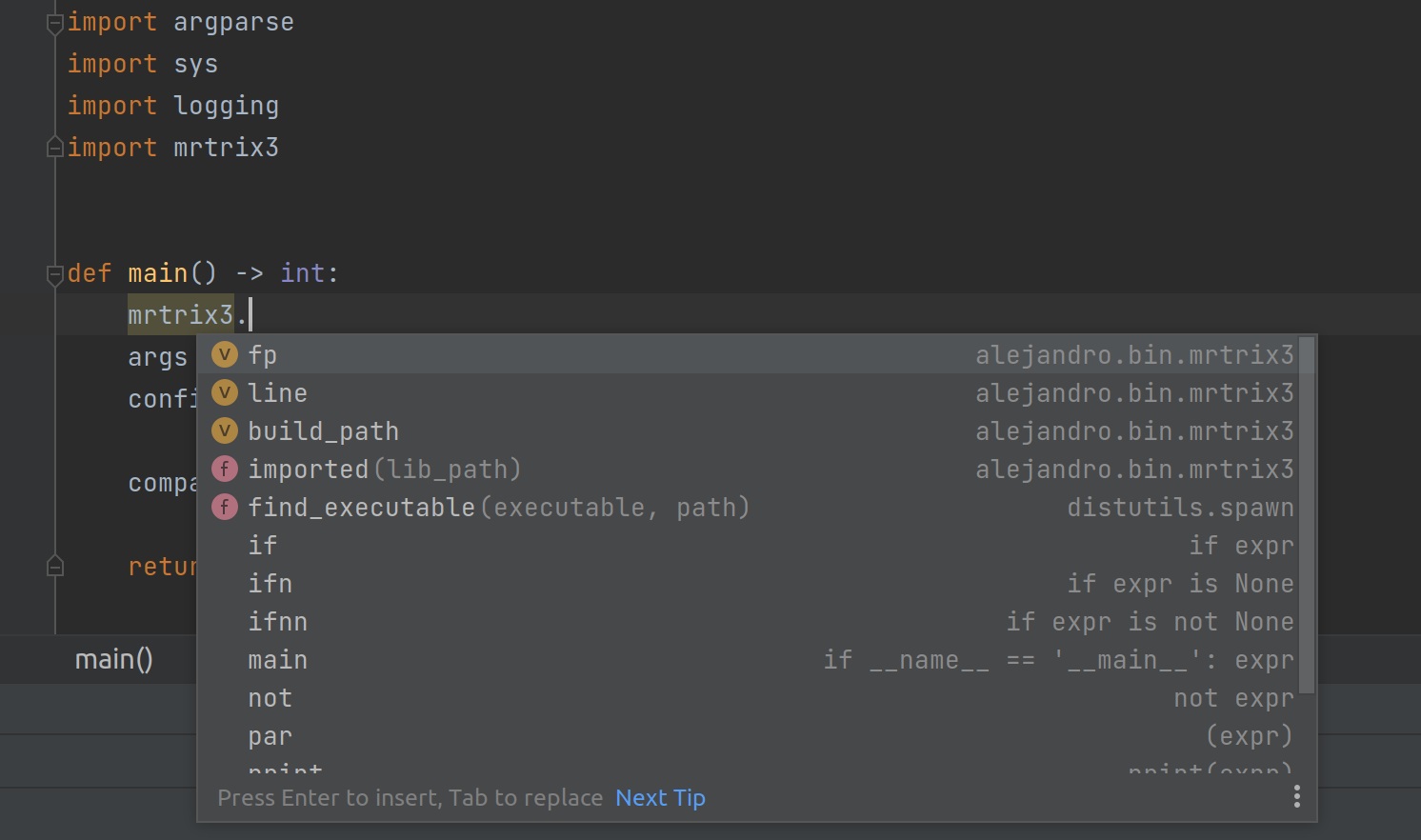
Unfortunately, running your bash script also failed when it tried to compile mrtrix after cloning it. It complains about `Eigen3` in `./configure -noshared -nogui` and I don’t want to go down the route of recompiling mrtrix, i’m sure that the precompiled version can still be used in python, right?
So I can think of two things
1. My import is not working properly and it’s not bringing everything that the mrtrix python module has to offer and that your sample `mralign.py` is using
2. your sample script was importing a different version of the mrtrix3 python module that has changed now but because you are checking out `master` in your bash script, it doesn’t work any more
thanks for any pointers. and while at it, is there any documentaiton of what’s inside the mrtrix python module? how did you know about mrtrix3.app, mrtrix3.run, etc
---
### Author:  [@maxpietsch](https://community.mrtrix.org/u/maxpietsch)
#### Post date: [November 2, 2021, 10:59pm UTC](https://community.mrtrix.org/t/the-mrtrix3-python-script-library/2243/7 "2021-11-02T22:59:41Z")
Looks like your setup of the module did not work as it is importing and showing the attributes of `bin/mrtrix3.py` rather than of the `lib/mrtrix3/` module located in the main mrtrix3 installation folder.
If you want to tinker yourself, you can use the following test script (`mrtest`) and compare your output to mine. Otherwise, I’d suggest opening a new (non-wiki) follow up post with full details about the installation method and setup of the module so we can reproduce it. I _think_ external python scripts should work with the binary installers (and the Docker image) but I suspect that’s not widely tested so details about your installation would be helpful.
Documentation is fairly thin but as Rob said, it’s a lightweight module. Anything that can be done in bash can be done in the Python API as well – plus some convenience features such as a scratch directory and parsing header information… as listed above. I’d suggest you start with the example script and go copy-pasting from the shorter scripts in [mrtrix3/bin at master · MRtrix3/mrtrix3 · GitHub](https://github.com/MRtrix3/mrtrix3/tree/master/bin). You’ll get to know 95% of the functionality you need fairly quickly (and if you’re hungry for _more_: [MRtrix3\_connectome/mrtrix3\_connectome.py at master · BIDS-Apps/MRtrix3\_connectome · GitHub](https://github.com/BIDS-Apps/MRtrix3_connectome/blob/master/mrtrix3_connectome.py)).
Debug script:
```python
#!/usr/bin/env python
def usage(cmdline):
cmdline.set_author('Author')
cmdline.set_synopsis('Test installation')
cmdline.add_argument('dummy', help='not used')
cmdline.add_description('Check module.')
def execute():
import inspect
print('module location:')
print(mrtrix3. __file__ )
print('module attributes:')
print(dir(mrtrix3))
src = inspect.getsource(mrtrix3)
print('module source:')
print(src)
from mrtrix3 import MRtrixError, app, image, path, run
# Execute the script
import mrtrix3
mrtrix3.execute()
```
which is in my case located in `~/mrtrix3_extra/mralign/bin`:
```auto
➜ tree mralign
mralign
├── bin
│ ├── mralign
│ ├── mrtest
│ ├── mrtrix3.py -> ../../mrtrix3/bin/mrtrix3.py
│ └── mrtrix3.pyc
├── build
└── cmd
➜ mrtrix3_extra cat mralign/build
/Users/mp/mrtrix3_extra/mrtrix3/build
```
produces the output
```auto
➜ mrtest 0
module location:
/Users/mp/mrtrix3_extra/mrtrix3/lib/mrtrix3/ __init__.py
module attributes:
['ANSI', 'ANSICodes', 'BIN_PATH', 'COMMAND_HISTORY_STRING', 'CONFIG', 'EXE_LIST', 'MRtrixBaseError', 'MRtrixError', ' __builtins__', ' __cached__', ' __doc__', ' __file__', ' __loader__', ' __name__', ' __package__', ' __path__', ' __spec__', ' __version__', ' __warningregistry__', '_version', 'app', 'arg', 'build_path', 'config_path', 'execute', 'f', 'find_executable', 'fp', 'imp', 'imported', 'inspect', 'line', 'namedtuple', 'os', 'quote', 'run', 'setup_ansi', 'sys', 'utils']
module source:
# Copyright (c) 2008-2021 the MRtrix3 contributors.
#
# This Source Code Form is subject to the terms of the Mozilla Public
# License, v. 2.0. If a copy of the MPL was not distributed with this
# file, You can obtain one at http://mozilla.org/MPL/2.0/.
#
# Covered Software is provided under this License on an "as is"
# basis, without warranty of any kind, either expressed, implied, or
# statutory, including, without limitation, warranties that the
# Covered Software is free of defects, merchantable, fit for a
# particular purpose or non-infringing.
# See the Mozilla Public License v. 2.0 for more details.
#
# For more details, see http://www.mrtrix.org/.
import inspect, os, sys
from collections import namedtuple
try:
from shlex import quote
except ImportError:
from pipes import quote
from mrtrix3._version import __version__
class MRtrixBaseError(Exception):
pass
class MRtrixError(MRtrixBaseError): #pylint: disable=unused-variable
pass
...
```