I have a quick question! I have been trying to visually inspect the output of the different pre-processing steps using mrview and I get the following error:
mrview: unknown option "-roi.load"
mrview: unknown option "-odf.load_shd"
mrview: unknown option "-tractography.load"
Any advice would be much appreciated.
You might have multiple mrview in your path as these options existed for quite some time.
I suspect your current mrview lives in ~/mrtrix3/release/bin/mrview. Check that the path of which mrview matches that one. If not you’ll need to edit your PATH variable presumably in .bash_profile or .bashrc. You can check your PATH with echo $PATH.
You can find out your version with mrview --version. The latest is mrview 0.3.15-222.
I think I am having the same problem here because I don’t get these options . I checked my path and it is /Applications/mrtrix-0.2.12/bin:/applications/mrtrix3/bin:/usr/local/fsl/bin:/usr/bin:/bin:/usr/sbin:/sbin:/usr/local/bin:/opt/X11/bin
Is this wrong? Can you please help me to fix it?
Thank you!
Thanks for such a quick response! Yes I have mrtrix3 installed on this computer as well. In my applications folder I have mrtrix-0.2. 12 and mrtrix3
I’m guessing I did something wrong with the installation? We had to trade computers here a while ago so when I took over this Mac I loaded in my user profile… I wonder if that caused the problem? How do I fix it?
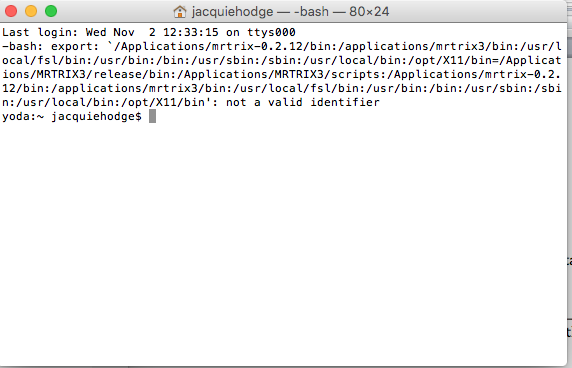
As way too often, the error is in the first line and error message appears because of a typo I had in the export statements: it should be export PATH=... not export $PATH=...
To fix it, remove the last line(s) in ~/.bashrc and ~/.bash_profile that contain referrnces to /Applications/MRTRIX3.
Then, type echo "export PATH=/applications/mrtrix3/bin:/applications/mrtrix3/scripts:$PATH" >> ~/.bash_profile
open a new terminal and type
`echo $PATH".
/applications/mrtrix3/bin should be the first entry in your PATH (or at least before /Applications/mrtrix-0.2.12). If not then we need to find out where your PATH is modified after sourcing .bash_profile.
Thanks, so when I do this I have all of this text show up:
export /Applications/mrtrix-0.2.12/bin:/applications/mrtrix3/bin:/usr/local/fsl/bin:/usr/bin:/bin:/usr/sbin:/sbin:/usr/local/bin:/opt/X11/bin=/Applications/MRTRIX3/release/bin:/Applications/MRTRIX3/scripts:/Applications/mrtrix-0.2.12/bin:/applications/mrtrix3/bin:/usr/local/fsl/bin:/usr/bin:/bin:/usr/sbin:/sbin:/usr/local/bin:/opt/X11/bin
mrtrix3 is referenced 3 times - how much of this do I erase?
Okay so I have done that in the ~/.bash_profile and when I do cat ~/.bash_profile now I get:
bash-3.2$ cat ~/.bash_profile
export PATH=/applications/mrtrix3/bin:/applications/mrtrix3/scripts:/Applications/mrtrix
export PATH=/applications/mrtrix3/bin:/applications/mrtrix3/scripts:/Applications/mrtrix-0.2.12/bin:/applications/mrtrix3/bin:/usr/local/fsl/bin:/usr/bin:/bin:/usr/sbin:/sbin:/usr/local/bin:/opt/X11/bin
Is this okay? Is it all fixed now?
Thank you so much for being so patient with me!!
Actually, the line you posted is entirely consistent with the typo mentioned earlier: export $PATH=... would have substituted the whole path rather than assigning to PATH. @Jhodge, you want to delete that line, and use the new set_path script, which we added a few months ago to simplify this process - see instructions on installation page. That should sort things out properly - but you do need to remove the mess created by earlier attempts in the files @maxpietsch mentioned before proceeding…
Okay so I did cd /Applications/mrtrix3 and then ./set_path and got this error…
ERROR: MRtrix3 executables not found in expected location.
This script needs to be run from within the MRtrix3 toplevel directory, AND
after the build script has successfully completed. In addition, the set_path
script should NOT be moved from its original location in the MRtrix3 toplevel
directory.
Sorry for the trouble but I think we are nearly there. Be careful with paths as they are case sensitive:
You mention /Applications/mrtrix3 and /applications/mrtrix3.
set_path checks whether there is a directory called release in the same folder. This should be the case for the latest mrtrix3 and default installation but your installation might differ.
To fix your problem, just remove the (fist) line in .bash_profile:

 and error message appears because of a typo I had in the export statements: it should be