Hello everyone,
I am currently building a pipeline for tractography and connectome generation using MRtrix3, and I have a few questions regarding the correct workflow.
First, I would like to confirm whether the processing steps I am currently following are appropriate. I have attached an image of the pipeline for reference, and I would appreciate any feedback on whether the structure is correct or if any steps are missing or unnecessary.
One specific question concerns the T1-to-DWI registration step. In my case, the T1 and DWI images I received are already co-registered. Because of this, I assume that the registration step may not be necessary.
However, I am unsure at which point in the pipeline I should start using the co-registered images. Specifically, I would like to understand:
-
Should the co-registered images be introduced during the T1 processing stage?
-
Should they instead be used during the DWI processing stage?
-
Or should they only be used later during tractography or connectome generation?
In other words, when working with already co-registered T1 and DWI data, I would like to know at which stage of the pipeline these images should be incorporated.
I am also unsure whether some steps still require the original T1 and DWI images, or whether the co-registered versions should be used directly from the beginning.
Finally, I would also like to ask about the methodology I am following. I am currently using a tutorial as a guide to build the pipeline, but I also have a complete script containing all the steps. I would appreciate any advice on whether the tutorial approach is appropriate, or if it would be better to rely on the full script instead.
Tutorial of MRtrix3 that I’m following:
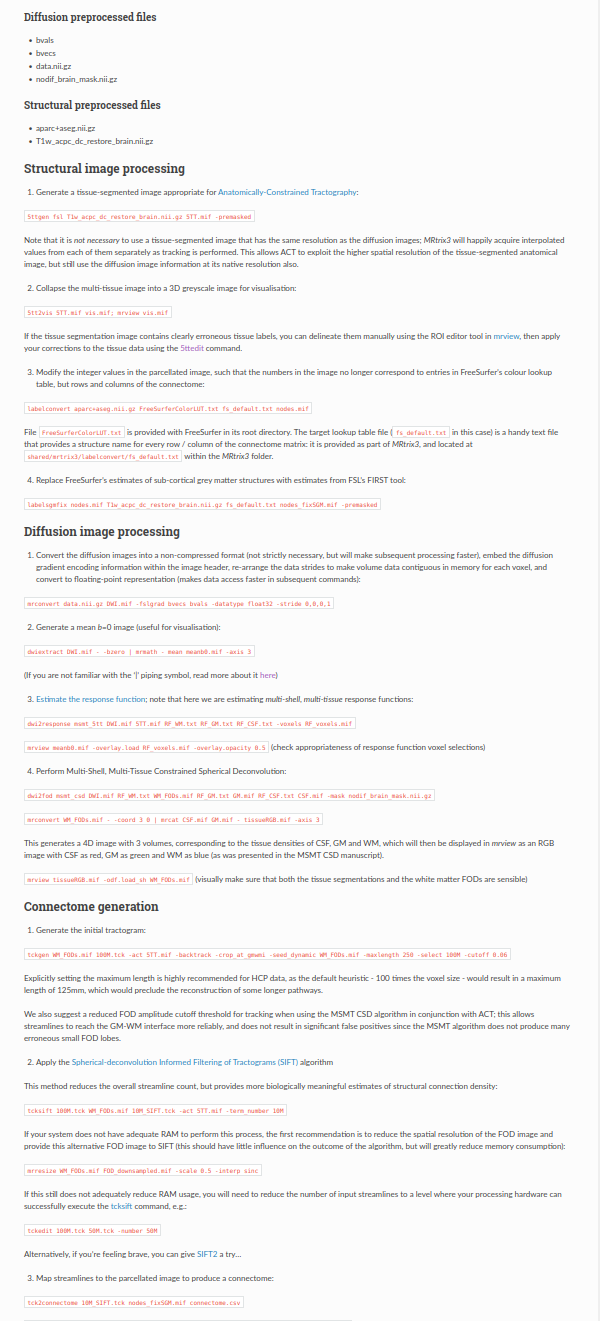
Script of my pipeline:
#!/bin/bash
set -e
set -x
############################################################
INPUTS
############################################################
T1_NII=“T1.nii.gz”
DWI_NII=“DWI.nii.gz”
BVEC=“DWI.bvec”
BVAL=“DWI.bval”
FS_SUBJECTS_DIR=“$HOME/freesurfer_subjects”
FS_SUBJECT=“subject04”
Adjust if needed:
FREESURFER_LUT=“/usr/local/freesurfer/luts/FreeSurferColorLUT.txt”
MRTRIX_FS_MAP=“/opt/mrtrix3/share/mrtrix3/labelconvert/fs_default.txt”
############################################################
0) PREPARE DIRECTORIES
############################################################
echo “============================================================”
echo “STEP 0: PREPARE DIRECTORIES”
echo “============================================================”
mkdir -p work
cd work
export SUBJECTS_DIR=“$FS_SUBJECTS_DIR”
############################################################
1) CONVERT INPUTS TO MRTRIX FORMAT
############################################################
echo “============================================================”
echo “STEP 1: CONVERT INPUTS TO MRTRIX FORMAT”
echo “============================================================”
mrconvert ../“$T1_NII” T1.mif
mrconvert ../“$DWI_NII” DWI_raw.mif -fslgrad ../“$BVEC” ../“$BVAL” -datatype float32 -stride 0,0,0,1
############################################################
2) DWI PREPROCESSING
############################################################
Your acquisition appears to be single phase-encoding with no reverse PE.
If you actually have reverse PE / fieldmap data, this section should be changed.
echo “============================================================”
echo “STEP 2: DWI PREPROCESSING”
echo “============================================================”
dwidenoise DWI_raw.mif dwi_denoised.mif
mrdegibbs dwi_denoised.mif dwi_denoised_degibbs.mif
dwifslpreproc dwi_denoised_degibbs.mif dwi_preproc.mif
-rpe_none
-pe_dir AP
-eddy_options " --slm=linear --data_is_shelled "
dwibiascorrect ants dwi_preproc.mif dwi_preproc_bias.mif
############################################################
3) CREATE DWI REFERENCE IMAGE (MEAN B0)
############################################################
echo “============================================================”
echo “STEP 3: CREATE DWI REFERENCE IMAGE (MEAN B0)”
echo “============================================================”
dwiextract dwi_preproc_bias.mif - -bzero | mrmath - mean mean_b0_dwi.mif -axis 3
mrconvert mean_b0_dwi.mif mean_b0_dwi.nii.gz
############################################################
4) T1 BRAIN EXTRACTION FOR REGISTRATION
############################################################
T1 is a better registration target than 5TT for FLIRT.
Brain extraction is commonly used to improve T1<->DWI registration robustness.
echo “============================================================”
echo “STEP 4: T1 BRAIN EXTRACTION FOR REGISTRATION”
echo “============================================================”
mrconvert T1.mif T1.nii.gz
bet T1.nii.gz T1_brain.nii.gz -R
############################################################
5) GENERATE 5TT IN T1 SPACE
############################################################
MRtrix ACT requires a 5TT image derived from T1 anatomy aligned to DWI space.
echo “============================================================”
echo “STEP 5: GENERATE 5TT IN T1 SPACE”
echo “============================================================”
5ttgen fsl T1.mif 5TT.mif -premasked
5ttcheck 5TT.mif
5tt2vis 5TT.mif vis_5TT.mif
############################################################
6) FREESURFER PARCELLATION IN T1 SPACE
############################################################
recon-all creates aparc+aseg in anatomical space.
echo “============================================================”
echo “STEP 6: FREESURFER PARCELLATION IN T1 SPACE”
echo “============================================================”
recon-all -i T1.nii.gz -s “$FS_SUBJECT” -all
mri_convert “$SUBJECTS_DIR/$FS_SUBJECT/mri/aparc+aseg.mgz” aparc+aseg.nii.gz
labelconvert aparc+aseg.nii.gz
“$FREESURFER_LUT”
“$MRTRIX_FS_MAP”
nodes.mif
labelsgmfix nodes.mif T1.nii.gz “$MRTRIX_FS_MAP” nodes_fixSGM.mif -premasked
############################################################
7) REGISTER DWI TO T1
############################################################
Estimate transform using mean b0 → T1 brain.
6 DOF is usually appropriate for same-subject rigid alignment.
Then invert it to map T1-derived images into DWI space.
echo “============================================================”
echo “STEP 7: REGISTER DWI TO T1”
echo “============================================================”
flirt -in mean_b0_dwi.nii.gz
-ref T1_brain.nii.gz
-dof 6
-cost normmi
-omat diff2struct_fsl.mat
convert_xfm -omat struct2diff_fsl.mat -inverse diff2struct_fsl.mat
############################################################
8) TRANSFORM T1-DERIVED IMAGES INTO DWI SPACE
############################################################
echo “============================================================”
echo “STEP 8: TRANSFORM T1-DERIVED IMAGES INTO DWI SPACE”
echo “============================================================”
mrconvert 5TT.mif 5TT.nii.gz
mrconvert nodes_fixSGM.mif nodes_fixSGM.nii.gz
5TT: use trilinear interpolation for reslicing
flirt -in 5TT.nii.gz
-ref mean_b0_dwi.nii.gz
-applyxfm
-init struct2diff_fsl.mat
-interp trilinear
-out 5TT_coreg.nii.gz
Nodes/parcellation: use nearest neighbour to preserve integer labels
flirt -in nodes_fixSGM.nii.gz
-ref mean_b0_dwi.nii.gz
-applyxfm
-init struct2diff_fsl.mat
-interp nearestneighbour
-out nodes_fixSGM_coreg.nii.gz
mrconvert 5TT_coreg.nii.gz 5TT_coreg.mif
mrconvert nodes_fixSGM_coreg.nii.gz nodes_fixSGM_coreg.mif
############################################################
9) CREATE GMWMI SEED MASK IN DWI SPACE
############################################################
For ACT seeding.
echo “============================================================”
echo “STEP 9: CREATE GMWMI SEED MASK IN DWI SPACE”
echo “============================================================”
5tt2gmwmi 5TT_coreg.mif gmwmi_seed_coreg.mif
############################################################
10) RESPONSE FUNCTION ESTIMATION
############################################################
dhollander is a robust default when using single-shell or multi-shell data.
echo “============================================================”
echo “STEP 10: RESPONSE FUNCTION ESTIMATION”
echo “============================================================”
dwi2mask dwi_preproc_bias.mif dwi_mask.mif
dwi2response dhollander dwi_preproc_bias.mif
wm_response.txt gm_response.txt csf_response.txt
-mask dwi_mask.mif
############################################################
11) FOD ESTIMATION
############################################################
echo “============================================================”
echo “STEP 11: FOD ESTIMATION”
echo “============================================================”
dwi2fod msmt_csd dwi_preproc_bias.mif
-mask dwi_mask.mif
wm_response.txt wm_fod.mif
gm_response.txt gm.mif
csf_response.txt csf.mif
############################################################
12) NORMALISATION
############################################################
echo “============================================================”
echo “STEP 12: NORMALISATION”
echo “============================================================”
mtnormalise
wm_fod.mif wm_fod_norm.mif
gm.mif gm_norm.mif
csf.mif csf_norm.mif
-mask dwi_mask.mif
############################################################
13) TRACTOGRAPHY WITH ACT
############################################################
The tractogram and ACT image are both in DWI space.
echo “============================================================”
echo “STEP 13: TRACTOGRAPHY WITH ACT”
echo “============================================================”
tckgen wm_fod_norm.mif tracks_10M.tck
-act 5TT_coreg.mif
-backtrack
-seed_gmwmi gmwmi_seed_coreg.mif
-select 10000000
-maxlength 250
-cutoff 0.06
############################################################
14) SIFT2
############################################################
echo “============================================================”
echo “STEP 14: SIFT2”
echo “============================================================”
tcksift2 tracks_10M.tck wm_fod_norm.mif sift2_weights.txt
-act 5TT_coreg.mif
############################################################
15) CONNECTOME CONSTRUCTION
############################################################
IMPORTANT: nodes image must be in DWI space.
echo “============================================================”
echo “STEP 15: CONNECTOME CONSTRUCTION”
echo “============================================================”
tck2connectome tracks_10M.tck
nodes_fixSGM_coreg.mif
connectome_counts.csv
-assignment_radial_search 2
tck2connectome tracks_10M.tck
nodes_fixSGM_coreg.mif
connectome_sift2.csv
-tck_weights_in sift2_weights.txt
-assignment_radial_search 2
############################################################
16) OPTIONAL: NODE-PAIR EXEMPLAR STREAMLINES
############################################################
echo “============================================================”
echo “STEP 16: OPTIONAL: NODE-PAIR EXEMPLAR STREAMLINES”
echo “============================================================”
connectome2tck tracks_10M.tck
nodes_fixSGM_coreg.mif
exemplar_tracks
-files single
-exemplars nodes_fixSGM_coreg.mif
############################################################
17) QC VISUALISATION
############################################################
echo “============================================================”
echo “STEP 17: QC VISUALISATION”
echo “============================================================”
mrview mean_b0_dwi.mif
-overlay.load 5TT_coreg.mif
mrview mean_b0_dwi.mif
-overlay.load nodes_fixSGM_coreg.mif
echo “============================================================”
echo “PIPELINE FINISHED SUCCESSFULLY”
echo “============================================================”
Best regards.
Thank you very much in advance for your help.
Best regards.